2.4.1Description
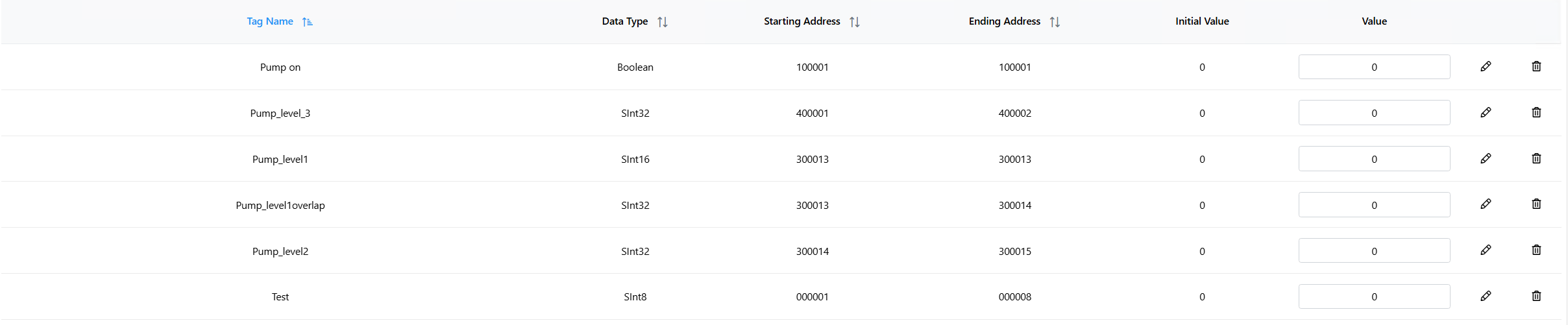
Tags allow a user to set understandable identifiers for a register address. An effective use of tags makes data much simpler and quicker to interpret. Here is an example of a compiled tag list:
Tag Name
A tag name is simply an understandable and applicable name for select data that the operator wishes to quickly understand and correlate.

Data Type
Boolean: The simplest form of data types which can only be either 1 (true) or 0 (false). Commonly used with discrete inputs.
Float Single/Double: Represents a float number (A number that has decimal places as opposed to a whole integer). A float single covers 32 bits while a float double covers 64. Doubles are used in applications that require more precision than a single can handle. A single accurately handles 7 decimal places while a double handles 16.
SInt8, UInt8, SInt16, SInt32,… : Signed (S) integers can represent both negative and positive values, while Unsigned (U) integers can only represent 0 and positive values.
Value To Binary Determination
When inputting a value for an integer over 16 bits (i.e. 32 or 64) or floats the program will convert the value to binary, then split that binary between 2 or 4 addresses respectively so that the sum of the addresses binary equals the entered value. Bit order also changes the way the binary equivalent is divided amongst registers. For example, if the data type is UInt32, integer byte order is CD BA, and starting register is 4x0, then register 4x0 will hold the most significant word and register 4x1 holds the least significant word.
Another example: if the data type is UInt8, integer bit order is 07, and starting register is 0x0, then the ending register will be 0x7 because it takes 8 coils to store a UInt8. 0x0 will hold the least significant bit and 0x7 will hold the most significant bit of the UInt8 value.

Starting Address / Ending Address
Starting address is the register address where the selected data will start. Ending address is determined by the selected data type. For instance an SInt8 that starts at address 1 will end at address 8. Meaning the value of that integer will be the binary value of 8 registers combined.

Initial Value
Initial value is the value that is copied to the tag when SimServe starts.

Value
Value is the desired value that can be set after starting the simulation. While a set value for a Boolean will just be 1 or 0 on a single register address, a value that spans multiple registers is broken up differently. For example, a SInt32 will span across two 16 bit registers. This value is not split numerically but instead based off its binary equivalent. So if we input a value of 1,000,000 for an SInt32, the first register will contain a numeric value of 15 with the second being 16960. This is because the binary of those two 16bit numbers will equal 1,000,000 combined.

Importing/Exporting Tag Configs & Values
SimServe allows a user to easily import and export all properties relating to a tag list. When importing, the user must follow a specific structure. The program accepts imports as a “.csv” file type. The structure of an imported tag config is as follows:
Name,DataType,StartingAddress,InitialValue
Example: a tag named Pump_Level_3 in a holding register (prefix 4x) starting at address 1 (400001) that has the SInt32 data type (spanning 2 addresses, since each address is 16 bits):
Pump_Level_3,SInt32,400001,0
Now, to import a value of 500, we would follow this format in a separate “.csv”:
Name,Value
So for this same tag the value list would be:
Pump_Level_3,500